
Kanban boards and a wiki.Nothing costs extra. Hosted in the EU.
Kanroo is task management with an open-source core, for businesses and teams. Every Kanroo Cloud plan includes every feature, from single sign-on (SSO) to the MCP server. Your workspace data is hosted and processed in the EU.
- No card needed
- Import from Trello or CSV
- Every feature on every plan

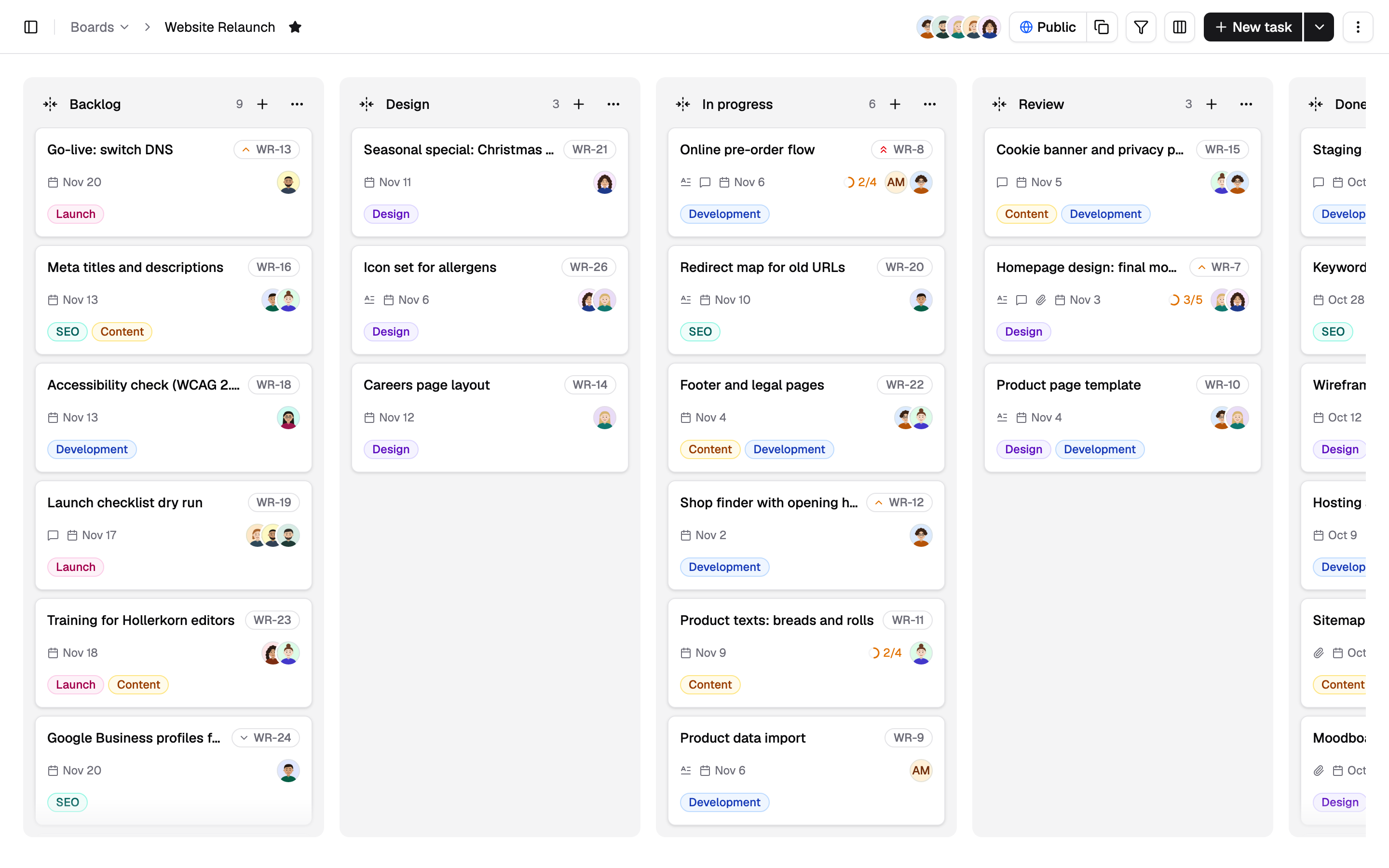
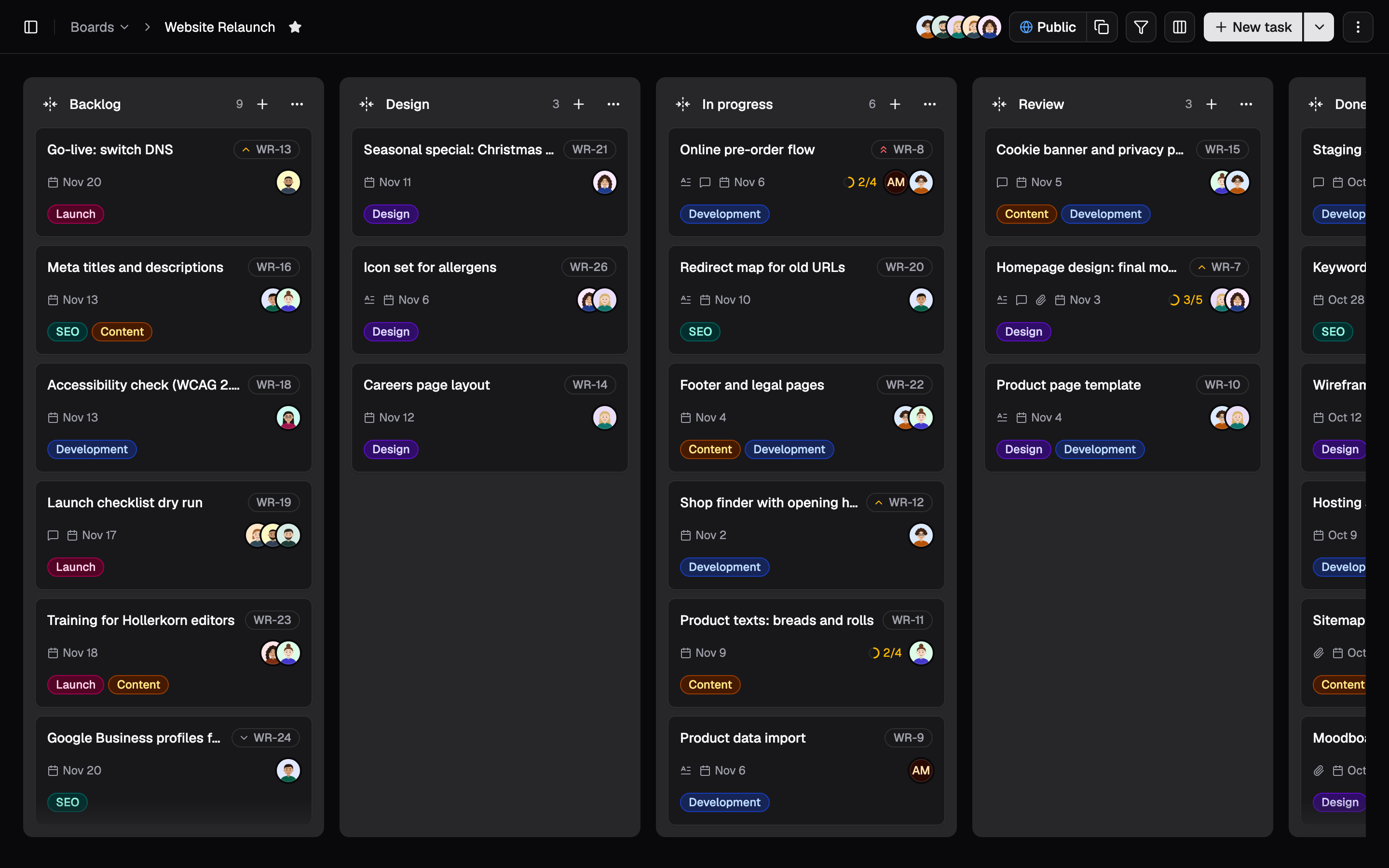


One tool
One place for the work around your tasks.
Kanroo takes the place of to-dos lost in group chats, scattered documents, paper lists, and separate form and feedback tools.
- Tasks and boardsLists, owners and due dates, in four views.
- WikiGuides, minutes and decisions next to the tasks.
- FormsEvery submission becomes a task.
- Voting and public roadmapShow your plans and let people vote.
- Email intakeForward an email, get a task.
- MCP agentsYour own AI agent works in your boards and wiki.
Three promises
What you can count on
Your workspace data stays in the EU.
We don’t sell or share your data.
Kanroo Cloud runs on servers in Nuremberg, Germany. Files are stored in Amsterdam. Emails leave from Paris. Two European companies process your workspace data: netcup and Scaleway. The app loads no third-party scripts and uses no CDN.
See every party on the mapEvery feature on every plan.
Kanban and wiki at the core. Around them, many features you’ll love, all included in every Kanroo Cloud plan: SSO, webhooks, the MCP server, forms, live updates and imports. Plans differ only in support and fair limits: members, file size, wiki pages and a few more.
See all limitsOpen source. Yours to run.
The Kanroo core is AGPL-3.0. Run it on your own server with Docker Compose, without plan limits. If Kanroo Cloud ever stops fitting, your exit is already built.
How the editions work- NurembergServers for the app, database, mail and monitoring
- AmsterdamObject storage for files
- ParisTransactional email
Free
- Boards and the wiki
- Single sign-on (SSO)
- Webhooks and API
- MCP server
- Live updates
- Imports and exports
- Members
- 1
- One file
- 5 MiB
- Wiki pages
- Up to 25
Team
The same features as Free.
- Boards and the wiki
- Single sign-on (SSO)
- Webhooks and API
- MCP server
- Live updates
- Imports and exports
- Members
- Up to 50
- One file
- 25 MiB
- Wiki pages
- Up to 250
Enterprise
The same features as Free.
- Boards and the wiki
- Single sign-on (SSO)
- Webhooks and API
- MCP server
- Live updates
- Imports and exports
- Members
- No limit
- One file
- 50 MiB
- Wiki pages
- No limit
Limits apply per organization, not per person.
$ docker compose up -d✔ postgres Healthy✔ kanroo-migrate Exited✔ kanroo-app Started✔ kanroo-worker Started✔ caddy Started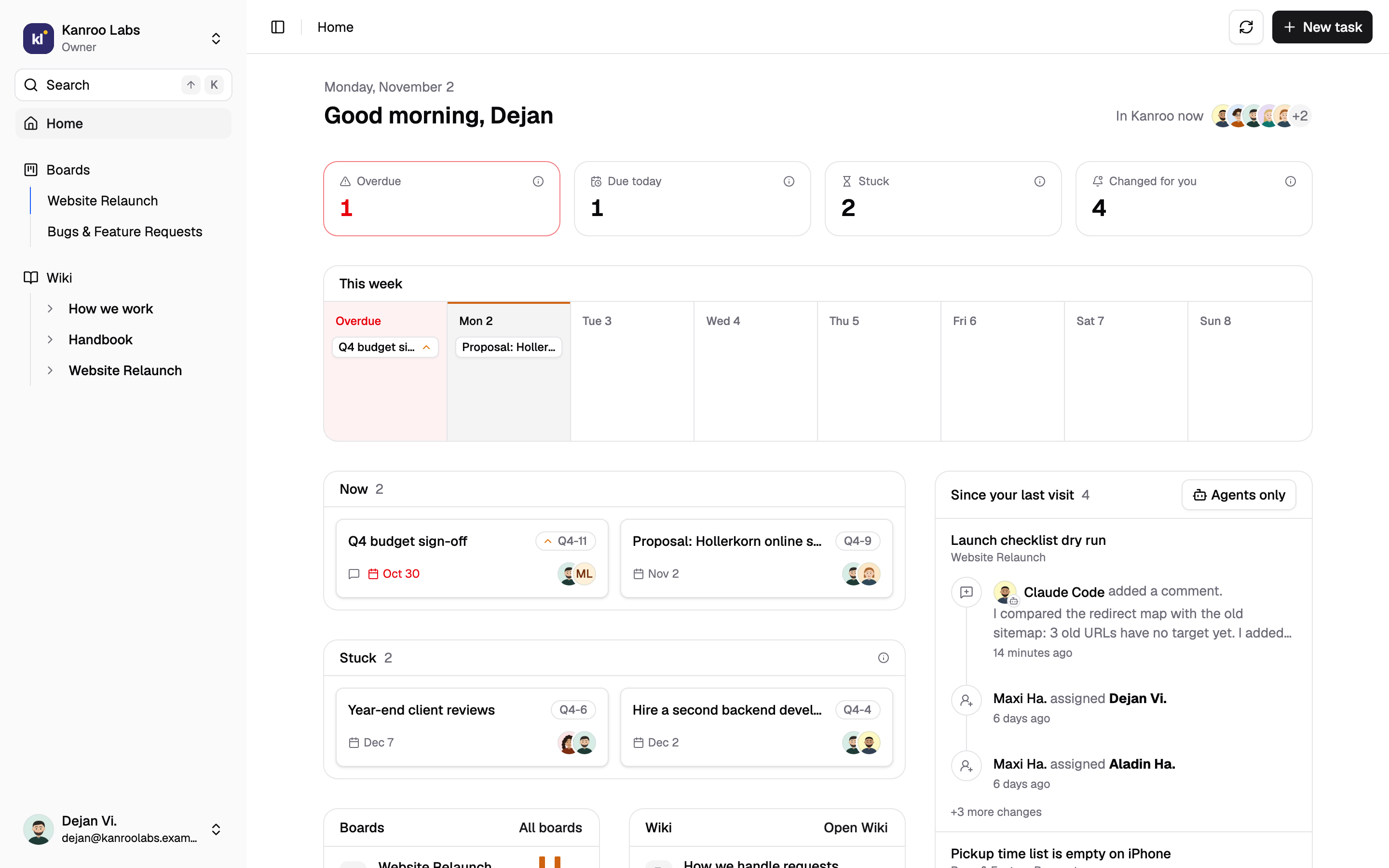
Your Kanroo, on your server.
Boards
Boards that stay clear as work grows.
Lists, tasks, labels, checklists and due dates. Switch the view, not the tool.
- Recurring tasks: every day, week, month or year.
- Soft WIP limits warn when a list gets full. They never block.
- A done list per board. Done tasks are never overdue.
- Task voting: members and guests vote, you sort by most votes.
- Filters and views live in the URL. Share exactly what you see.
Wiki
The wiki is built in.
Write the how-to next to the to-do. Organize pages in spaces, nest them, and link a page from a task or a task from a page.
- Markdown with tables, callouts, task lists and Mermaid diagrams.
- Edit diagrams visually, no syntax needed.
- Version history with restore.
- Share a page with as many links as you need, one per customer if you like. Each link can have a password and an expiry date.
- Import and export Markdown.
Requests
Let requests come in.
Build a form from a template or from scratch, and put it on your website or in your help center. Every submission lands as a task on the right board, with its answers and files.
- Run a ticket systemEach request becomes a task. Triage it on a board with labels, owners and due dates.
- Build the form you needTemplates for IT helpdesk, order requests and feedback, 11 field types and a live preview. The sender confirms with an email code, and the answers wait under “Form details” in the task.
- Forward emails to create tasksGive a board its own address with Email Intake and forward mails from your inbox.
- Show progress in publicShare a board, such as your roadmap, and let visitors vote on tasks. Search engines are asked to stay away, no email address is ever shown, and members can hide their names.
MCP
Built for people. Open to your agents.
Kanroo has no built-in AI and sells no AI credits. When you want an agent, connect your own through MCP: remote over HTTPS, or local on your machine.
- 116 tools for boards, tasks, the wiki and administration.
- Every key has a scope: read, write or admin. A key never gets more than its user’s role.
- Agent keys name the agent and its owner on every change. “Agents only” filters your Home.
- Setup guides for Claude Code, Codex and Cursor. Any MCP client that can send a bearer token, or start a local server, works.
- Also a REST API (OpenAPI 3.1) and signed webhooks.
Example: an agent reads the wiki page "Sitemap" and creates five tasks in the list "Backlog" on the board "Website Relaunch".
Keyboard and accessibility
Fast with a keyboard. Usable without a mouse.
39 shortcuts. ShiftK opens a search across tasks, boards and pages. Every drag and drop has a move menu as an alternative. Visible focus, checked contrast in both themes, and reduced motion respected.
- ShiftKSearch tasks, boards and pages
- ShiftNNew task
- Shift?All shortcuts
Every plan
All of this is in every plan.
No add-ons and no feature tiers. From Free to Enterprise, every Kanroo Cloud plan has the full list. Plans differ only in fair limits and support.
Boards and tasks
- Board, Swimlane, Calendar and Table views
- Task keys such as WR-7
- Markdown descriptions, priority, due date
- Labels with 10 color presets
- Assignees and followers
- Checklists with progress on the task
- Comments with @mentions
- Task voting, sorted by most votes
- Attachments by drag and drop
- Recurring tasks
- Soft WIP limits
- A done list: done tasks are never overdue
- Board templates, built in and your own
- Filters that stay in the URL
- Archive, restore and print
Wiki
- Spaces with their own roles
- Pages nested up to 5 levels
- Tables, task lists, callouts, images
- Mermaid diagrams, also edited visually
- Version history with restore
- Links between pages and tasks
- Shares with password and expiry date
- Markdown import and export
Intake and sharing
- Form builder with templates and 11 field types
- Answers under “Form details” in the task
- Email Intakes: email to task
- Public boards: visitors read along and vote
Working together
- Live updates and presence, with privacy switches
- Your name on public pages only if you want
- Email notifications, one-click unsubscribe
- Web push notifications
- Teams and access per board and space
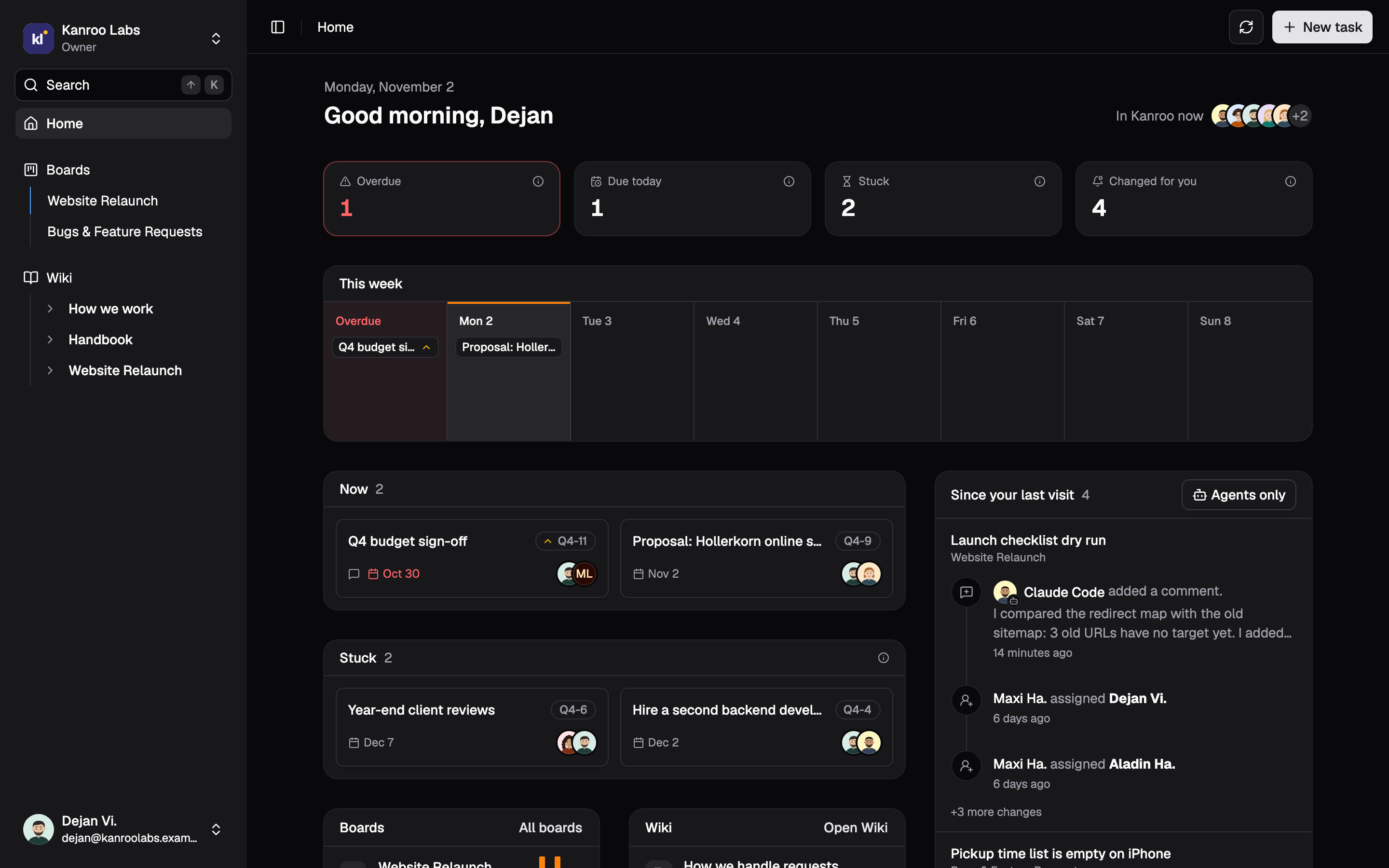
- A personal Home with your agenda
- More than one organization per account (each further one on a paid plan)
Speed and comfort
- Search across tasks, boards and pages on ShiftK
- 39 keyboard shortcuts
- Favorite boards in the sidebar, on Shift1–9
- Light, dark and system theme
- App in English and German, emails in each recipient’s language
- Installable web app (PWA)
Integrations
- MCP server, remote and local
- REST API with OpenAPI 3.1
- Personal API keys with 3 scopes
- Agent keys: every agent action named
- Signed webhooks
- Webhooks to Zapier, Make, n8n Cloud and Power Automate
Security and control
- Sign-in with an email code, no passwords
- Single sign-on (SSO) with OpenID Connect
- Audit log with CSV export
- Organization, board and space roles
Your data
- Import from Trello JSON and CSV
- Export as JSON, CSV and Markdown
- Self-service account deletion
- Workspace data hosted and processed in the EU
Switch and leave
Bring your boards. Take everything with you.
Only what a team needs. Nothing locked in.
Import
Trello boards as JSON, with labels and checklists. Any CSV, with column mapping, for exports from Jira, Asana or monday. Markdown into the wiki. Every import shows a preview first.
Export
Boards as JSON or CSV, and both import again, without comments, assignees and attachments. Wiki spaces as a Markdown ZIP. Archived tasks included.
Leave
A lower plan keeps your boards, tasks and pages. Account deletion is self-service. And the open-source core runs on your own server.
Kanroo Cloud
We run it. You get on with your work.
Updates, backups, monitoring and security – we handle them. Or keep everything under your control and self-host the open-source core.
Kanroo Cloud
Hosted by us in the EU
- Updates and security patches, installed for you
- Monitoring on our own servers
- Two sub-processors, both European
- Every feature on every plan
Self-hosted
On your own server
- Open-source core under AGPL-3.0
- Runs with Docker Compose
- No plan limits
- Your data stays on your infrastructure
Pricing
One fair price. Nothing held back.
Many tools charge you for the next tier. Kanroo charges you for the next person.
Free
€0
One person, every feature.
Team
€8per seat per month, billed yearly
All prices and limitsEnterprise
On request
Every feature, no member limit.
Kanroo Cloud or your own servers
No storage quota on any plan. Files up to 5, 25 or 50 MiB each, by plan. Fair use applies.
| Tool | Plan with SSO | Per year |
|---|---|---|
| KanrooBilled yearly. VAT is added at checkout. | Team | €960 |
| NotionNotion does not name the billing period of its euro prices. | Business | €2,340 |
| factrofactro does not say whether its prices include VAT. | Professional | €3,599 |
| MeisterTask | Enterprise | On request |
| Linear | Enterprise | On request |
| Asana | Enterprise | On request |
Product names are trademarks of their owners.
See pricing and limitsOpen Source Friends
Built on open source.
Kanroo stands on Angular, Express, PostgreSQL, Drizzle, Better Auth, Tiptap, Mermaid, Tailwind CSS and many more. We list the ones we use directly, with their licenses.
Honest fit
Plenty of tools do this. Pick the one that fits.
Cards move from left to right in a lot of apps. We compared Kanroo with the best-known ones, with dates and sources, and we say where they win. That is our rule: transparent by default. If one of them fits you better, take it. We think you will be back.
Kanroo fits if you …
- want boards and a wiki in one tool,
- need your workspace data in the EU,
- want SSO and an API without an Enterprise contract,
- prefer to connect your own AI agent,
- want the option to self-host the open-source core.
Not in Kanroo yet
- Gantt charts and time tracking
- Subtasks and custom fields
- Native mobile apps and offline work
Kanroo works in your phone’s browser. On Kanroo Cloud, add it to the home screen for push notifications, iPhone included.
These may come with community interest. Ask for them through the feedback form, or follow the roadmap.
FAQ
Questions, answered.
Is Kanroo really free?
Yes, for one person: every feature, with no time limit. To work together, upgrade the organization to Team.
What does “every feature on every plan” mean?
No Kanroo Cloud plan turns a feature off. Plans differ only in support and in fair limits, such as members, the size of one file, wiki pages and form submissions per month. The full table is on the pricing page.
Where is my data?
In the EU. Servers run at netcup in Nuremberg, Germany. Files are stored at Scaleway in Amsterdam, and emails are sent through Scaleway in Paris. These are our only two sub-processors. We don’t sell or share your data. The Team plan is billed by Polar Software, Inc. (USA) as merchant of record; Polar receives billing data, not your workspace data. Why the provider’s country matters as much as the server’s: EU hosting vs. EU company.
Is Kanroo open source?
The core is open source under AGPL-3.0. The Enterprise Edition and Kanroo Cloud are not. On Kanroo Cloud, Enterprise Edition features are included on every plan.
Can I self-host for free?
Yes. The core runs with Docker Compose and has no plan limits. SSO, live updates, webhooks, audit log, push notifications, Email Intakes and Reply by Email need the Enterprise Edition, with a 14-day free evaluation.
Enterprise on your own serversDoes Kanroo use AI?
No. There is no built-in AI and no AI provider gets your data from us. If you want an agent, connect your own through the MCP server.
How do you keep bugs out?
With tests. Next to unit and integration tests, every feature has end-to-end tests that click through it in a real browser. The tests of the open-source core are public on GitHub. Bugs can still slip through. If you find one, tell us.
Report a bugCan I move from Trello, Jira or Asana?
Trello boards import as JSON, with labels and checklists, but without comments and attachments. Jira, Asana and other tools import through CSV with column mapping. There is no live sync.
Does my team need training first?
Usually not. Every new account gets a “Getting started” board and a “Welcome” wiki space that show the basics in Kanroo itself. Boards start from a template or a Trello import, and people sign in with an email code, so nobody sets up a password. If someone gets stuck, step-by-step guides with annotated screenshots help.
Is Kanroo available in German?
Yes. The app is in English and German, and each person chooses their language in their settings. Emails go out in the language of the person who gets them.
Where tasks keep moving.
Start on your own today. Bring your team when you’re ready.